Short answer: Local Falcon is the specialist benchmark for Google Maps geo-grid tracking. SEO Runway is the best pick if you want geo-grid scans, Share of Local Voice and local competitors in the same project as your organic rankings, audits and reports. BrightLocal suits agencies that already use it for citations and reviews.
Disclosure: SEO Runway is our product. We ranked it using the same criteria as every other tool, and noted where others do better.
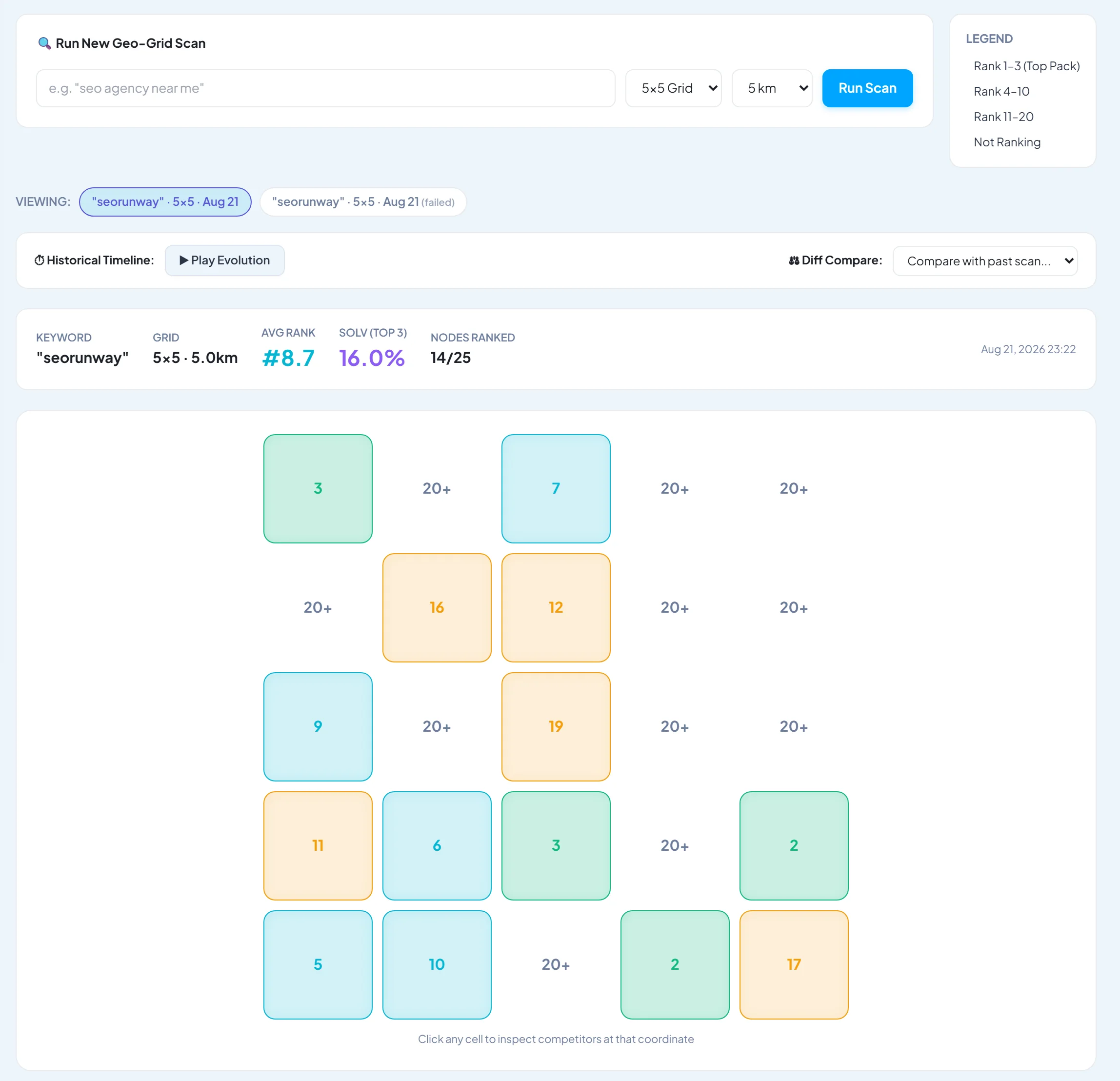
A normal rank tracker gives one map-pack position for one location. But a plumber can rank #1 on their own street and not appear at all three kilometres away. A geo-grid tracker searches from dozens of points across the area and colours each one by position, so you see the whole picture. For city- and ZIP-level organic tracking, see our guide to local rank trackers. This list is about the map pack.
Quick picks
- Best specialist: Local Falcon
- Best inside a full SEO platform: SEO Runway
- Best for BrightLocal users: BrightLocal Local Search Grid
- Best for GBP-heavy agencies: Local Viking
- Best for Semrush users: Semrush Map Rank Tracker
Geo-grid rank trackers compared
| Tool | Grid sizes | Pricing model | Competitors | Share of Local Voice | Scheduling | From |
|---|---|---|---|---|---|---|
| Local Falcon | Up to large grids | Credits per point | Yes | Yes | Yes | ~$25/mo* |
| SEO Runway | Multiple sizes | Included in Local plan | Yes, on the same grid | Yes | Yes | $19/mo (Local) |
| BrightLocal Local Search Grid | Multiple sizes | Credits / plan | Yes | Check | Yes | ~$39/mo* |
| Local Viking | Multiple sizes | Per location | Yes | Check | Yes | See site* |
| Semrush Map Rank Tracker | Multiple sizes | Local add-on | Yes | Check | Yes | Add-on* |
| Places Scout | Multiple sizes | Plan | Yes | Check | Yes | See site* |
| Local Dominator | Multiple sizes | Credits | Yes | Check | Yes | See site* |
| Leadsnap | Multiple sizes | Plan | Yes | Check | Yes | See site* |
| GeoRanker | Multiple sizes | Plan / API | Yes | Check | Yes | See site* |
| Pleper | Multiple sizes | Credits | Yes | Check | Check | See site* |
*Approximate entry price; verify. Credit-based tools cost more as grid size and scan frequency grow.
How we chose these tools
Every tool here runs true grid scans: Google Maps searches simulated from many coordinates, not a single location. We compared their published features, plans and documentation against six criteria:
- Grid sizes and radius: from a tight 3×3 to a city-wide 13×13 or larger.
- Cost per scan: what a weekly 7×7 scan for five keywords really costs each month.
- Competitor view: who ranks above you at each point.
- Share of Local Voice (SoLV): one number summarising the whole grid.
- Scheduling: automatic, repeatable scans.
- Reporting: client-ready output and history.
1. Local Falcon: the specialist benchmark
Verdict: the tool that made geo-grid tracking mainstream. It is deep, flexible and focused only on map rankings.
Best for: local SEO specialists and agencies who want the most grid control.
Key features: flexible grid shapes and sizes; SoLV and average rank metrics; competitor reports; scheduled scans; campaign reporting; AI-generated insights.
Pricing: credit-based, from around $25/month (verify).
Pros: grid depth and flexibility; strong competitor reports; trusted metrics.
Cons: credits run out fast on large grids; map rank only, so you need other tools for organic, audit and reporting.
2. SEO Runway: best geo-grid inside a full SEO platform
Verdict: geo-grid scans with Share of Local Voice and local competitors on the same grid, in the same project as organic rank tracking, site audit, citations, reviews and white-label reports.
Best for: agencies and multi-service businesses that sell local SEO alongside organic, AI search or Ads.
Key local features:
- Geo-grid map-pack scans with Share of Local Voice.
- Local competitors shown on the same grid.
- A citation audit (missing, inconsistent and duplicate listings) and review monitoring with sentiment, response rate, review-request links and QR codes.
- A local schema generator.
- City- and ZIP-level organic rank tracking next to the grid, plus results in white-label reports.
Pricing: Local SEO plans from $19/month; 14-day free trial. See plans.
Pros: map pack and organic local in one view; citations and reviews included; one report for the client.
Cons: fewer grid-shape options than Local Falcon; Google Business Profile management is not available yet.
3. BrightLocal Local Search Grid: best for BrightLocal users
Verdict: a solid grid tracker inside a popular local SEO suite.
Key features: grid scans; competitor views; it works with BrightLocal citations, reviews and reports.
Pricing: BrightLocal plans from around $39/month; grid usage depends on plan (verify).
Pros: a complete local suite; good reports.
Cons: no organic SEO depth beyond local.
4. Local Viking: best for GBP-focused agencies
Verdict: geo-grid tracking paired with Google Business Profile management tools.
Key features: grid tracking; GBP post scheduling; profile management.
Pricing: per location (verify).
Pros: GBP workflow.
Cons: narrower beyond maps and GBP.
5. Semrush Map Rank Tracker: best for Semrush users
Verdict: grid tracking as part of Semrush Local.
Pricing: part of the Semrush Local add-on (verify).
Pros: convenient for Semrush teams.
Cons: extra cost on top of Semrush; less grid control than specialists.
6. Places Scout: best for data-heavy local analysis
Verdict: a detailed local rank and competitor analysis tool.
Pricing: see Places Scout's site.
Pros: data depth.
Cons: a learning curve.
7. Local Dominator: best value credits
Verdict: an affordable grid tracker with flexible credits.
Pricing: see Local Dominator's site.
Pros: price.
Cons: lighter reporting.
8. Leadsnap: best for lead-gen agencies
Verdict: grid scans used as a sales tool to show prospects their map visibility.
Pricing: see Leadsnap's site.
Pros: prospecting reports.
Cons: less suited to long-term client tracking.
9. GeoRanker: best for API and data use
Verdict: local SERP and grid data, available through an API.
Pricing: see GeoRanker's site.
Pros: an API for custom dashboards.
Cons: less polished for non-technical users.
10. Pleper: best low-cost toolkit
Verdict: a low-cost local toolkit with grid scanning.
Pricing: credit-based (verify).
Pros: price; GBP utilities.
Cons: a basic interface.
How to read a geo-grid
Each dot on the map is one simulated search, and its colour and number show where your business ranked from that point. Green dots (positions 1–3) mean you appear in the map pack; amber means you are on the list but below the pack; red means you are buried or missing. Look for three patterns:
- A green centre fading to red: normal. Proximity matters, and the goal is to push the green outwards.
- Red on one side only: a competitor dominates that side, or your service area or category doesn't match there.
- Red even at the centre: a relevance or profile problem (category, name, reviews or suspension), not distance.
Share of Local Voice turns the grid into one number: the share of points where you appear in the top three. Track it monthly per keyword.
Choosing grid size and radius
- Match the radius to real customer travel: 1–3 km for dense city services (cafés, dentists), 5–15 km for trades that travel, and 20 km or more for rural areas.
- Use a dense enough grid to see the drop-off: 7×7 is a good default; 9×9 or 13×13 suits city-wide views.
- Keep settings identical between scans (same centre, radius, grid and keywords) so changes reflect rankings, not setup.
- Start with 3–5 money keywords per location before adding more, especially on credit-based tools.
Related local SEO guides
Prefer to hire an expert? See the best local SEO agencies in your city: [link to the matching published agency listicle].
Frequently asked questions
What is a geo-grid?
A geo-grid is a set of evenly spaced map points around a business. A geo-grid tracker runs the same Google Maps search from each point and records your position, producing a heat map of local visibility.
How accurate are map rank trackers?
They are a reliable simulation of what searchers see from each point, but individual results can vary with personalisation and timing. Use consistent settings and look at trends rather than single scans.
What is Share of Local Voice?
Share of Local Voice (SoLV) is the percentage of grid points where a business appears in the top three map results for a keyword. It summarises a whole heat map in one number.
How often should I run geo-grid scans?
Weekly or monthly is enough for most businesses. Run extra scans after major changes such as a category change, a new location or a review push.
Why do I rank well nearby but poorly further away?
Proximity is a strong local ranking factor. You can extend your reach with relevance (categories, services, content) and prominence (reviews, citations, links), but no business ranks first everywhere.
The bottom line
- Local SEO specialists wanting maximum grid control: Local Falcon.
- Agencies and businesses wanting map pack and organic, citations, reviews and reports together: SEO Runway.
- BrightLocal or Semrush users: use their built-in grid trackers.
- GBP-heavy workflows: Local Viking.
See your own Google Maps heat map: start a 14-day free trial of SEO Runway or see how local SEO works in SEO Runway.