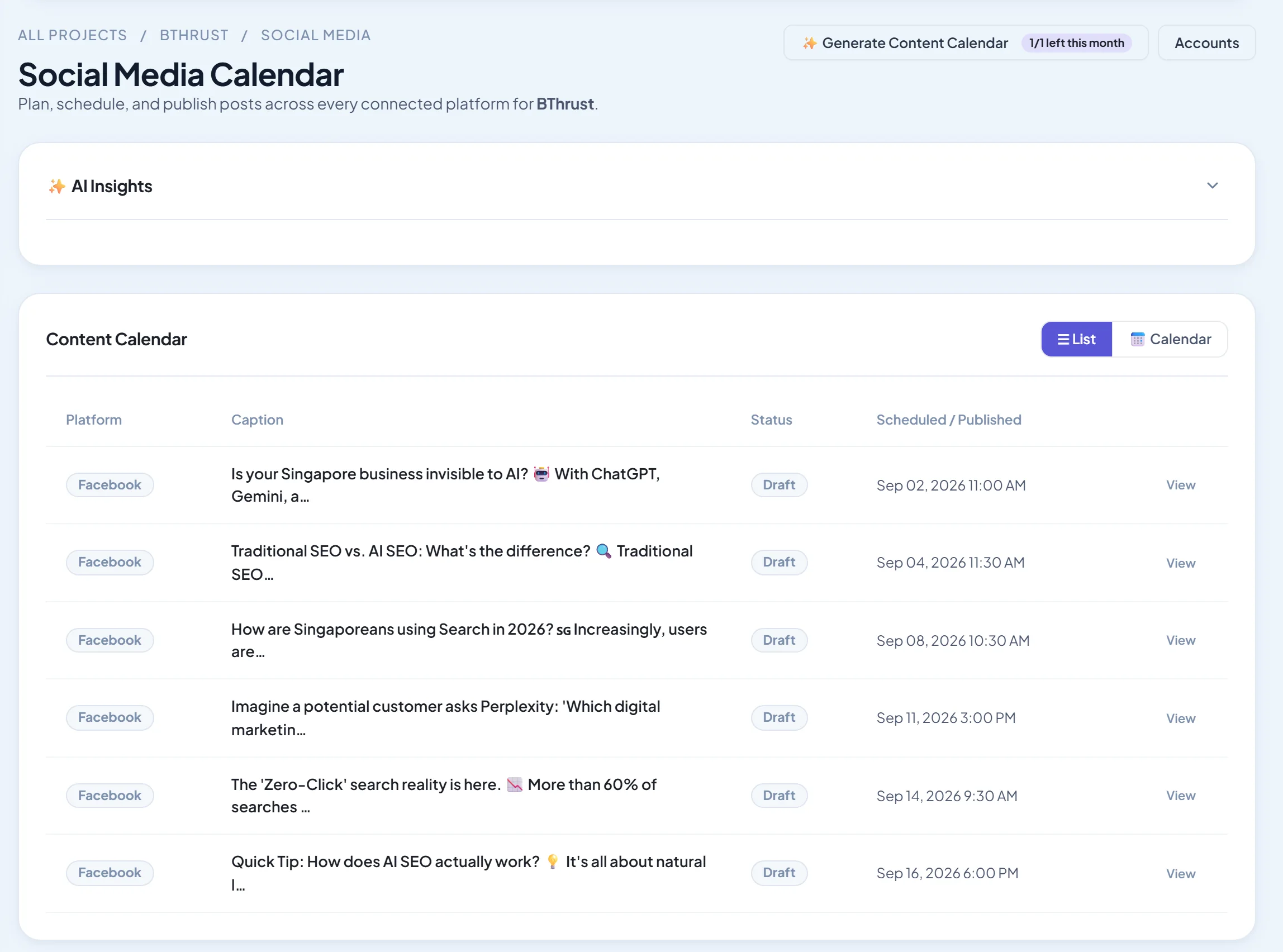
Short answer: Loomly and Planable are the best dedicated social media content calendars: Loomly for planning with post ideas, Planable for team and client collaboration. CoSchedule is best if social sits inside a wider marketing calendar. SEO Runway gives you list and month calendar views plus an AI-generated month of posts you can edit and publish to Facebook, Instagram and LinkedIn.
Disclosure: SEO Runway is our product. We ranked it using the same criteria as every other tool, and noted where others do better.
Quick picks
- Best planner with ideas: Loomly
- Best for collaboration: Planable
- Best marketing-wide calendar: CoSchedule
- Best AI month plan: SEO Runway
- Best free template approach: Notion
Content calendar tools compared
| Tool | Views | Collaboration | Approvals | AI planning | From |
|---|---|---|---|---|---|
| Loomly | Calendar, list | Yes | Yes | Post ideas, AI | See site* |
| Planable | Calendar, feed, grid | Best-in-class | Multi-level | AI assist | See site* |
| CoSchedule | Marketing calendar | Yes | Yes | AI assistant | See site* |
| SEO Runway | List, month | Team + client role | Sign-offs | AI monthly calendar | $39 |
| Later | Visual calendar | Yes | Partial | AI captions | ~$25* |
| Hootsuite | Planner | Yes | Yes | OwlyWriter | ~$99* |
| Sprout Social | Calendar | Yes | Yes | AI assist | ~$199* |
| Metricool | Planner | Yes | Partial | AI | Free / ~$22* |
| Sendible | Calendar | Yes | Yes | AI | ~$29* |
| Notion | Database views | Yes | Manual | Notion AI | Free / paid* |
*Approximate; verify.
How we chose these tools
We compared each tool's published features, plans and documentation on six criteria: calendar views, collaboration, content library, idea management, AI planning, and price.
1. Loomly: best planner with ideas
Verdict: a calendar that suggests post ideas and guides you through approvals.
Pros: ideas; workflow.
Cons: analytics depth.
2. Planable: best for collaboration
Verdict: clients and teams comment and approve on exact post previews.
Pros: collaboration.
Cons: light analytics.
3. CoSchedule: best marketing-wide calendar
Verdict: social alongside blogs, email and campaigns.
Pros: whole-marketing view.
Cons: price for full features.
4. SEO Runway: best AI month plan
Verdict: generate a month of on-brand post drafts with Gemini, review them in list or month view, edit with photo and video, then publish or schedule to Facebook, Instagram and LinkedIn.
Pricing: Social from $39/month; 14-day free trial. See plans.
Pros: fast monthly planning; client sign-offs; alongside SEO and local.
Cons: three networks only; no content library or idea board.
5. Later: best visual calendar
Verdict: drag-and-drop visual planning.
Pros: visuals.
Cons: post limits.
6. Hootsuite: best planner in a big suite
Verdict: a planner across many networks.
Pros: breadth.
Cons: price.
7. Sprout Social: best for larger teams
Verdict: calendar, campaigns and approvals at scale.
Pros: depth.
Cons: per-seat cost.
8. Metricool: best free planner
Verdict: a planner with analytics and a free tier.
Pros: free start.
Cons: limits.
9. Sendible: best for agencies
Verdict: calendars per client with approvals.
Pros: agency features.
Cons: interface.
10. Notion: best template approach
Verdict: a flexible database calendar you build yourself.
Pros: free; customisable.
Cons: no publishing.
A free content calendar template
Columns to include:
- Date and time
- Network
- Content pillar (for example education, proof, offer, behind the scenes)
- Format (image, carousel, video, text)
- Caption
- Asset link
- Link or call to action
- Owner
- Status (idea, draft, approved, scheduled, published)
- Result (reach, engagement), filled in after posting
Related guides
Frequently asked questions
How far ahead should I plan social content?
Two to four weeks for regular posts, with key campaigns planned a quarter ahead. Leave gaps for timely content.
What should a content calendar include?
Date, network, content pillar, format, caption, assets, call to action, owner and status, plus results after posting.
Can AI build a content calendar?
Yes. Tools like SEO Runway draft a month of posts from your brand inputs. Review and edit every post before scheduling.
The bottom line
- Planning with ideas: Loomly.
- Collaboration: Planable.
- Marketing-wide: CoSchedule.
- AI-drafted months for Facebook, Instagram and LinkedIn: SEO Runway.
Start a 14-day free trial of SEO Runway and generate next month's calendar, or see the social media workspace.